
Here will show you how to create and manage cPanel API tokens
- Login your cPanel
- Go to Security Section
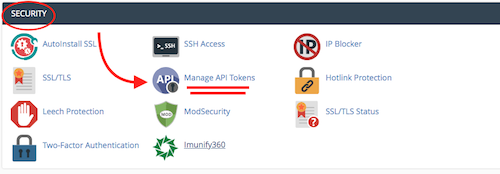
- Open Manage API Tokens
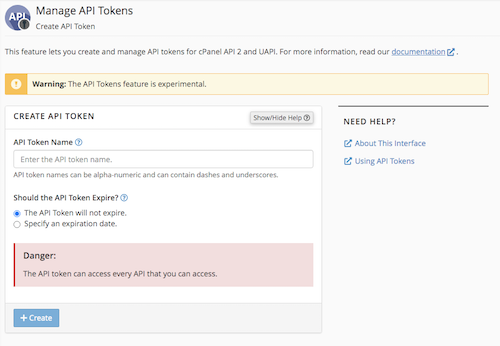
Be attention to these yellow and read notes on the page, and always read
the documentation that cPanel offer for more details
Create an API token
To create an API token, perform the following steps:
- Click Create. The Create API Token interface will appear.
- Enter a unique name in the API Token Name text box.
Note:
- An API token name can only contain up to 50 characters.
- You can only enter letters (
a-zandA-Z), numbers (0-9), dashes (-), and underscores (_).
- Select one of the following options from the Should the API Token Expire? section:
- The API Token will not expire. — This will create a token that does not have an expiration date.
- Specify an expiration date. — This allows you to create a token that expires on a specific date. By default, tokens expire one year from the current date.
Important:
- You cannot edit an API token expiration date after creation.
- When an API token expires, the system will not remove it. You must manually delete an API token.
4. Click Create. A new interface will appear.
- To copy the API token, click Copy. Think of this token as a password. You must enter this token each time that you use it.
- You must keep a copy and keep this token in a safe place.
Warning: You cannot access the token after you navigate away from the interface. If you forget or misplace this token, you must revoke the token and then create a new one.
5. Click Yes, I Saved My Token.
- To create a new token, select the Create another token after I click Yes, I saved my token checkbox.
- To return to the List API Tokens interface, deselect the Create another token after I click Yes, I saved my token checkbox.